What You Can Do with the App
Combination Notepad
The primary function offered by the SheetBoxing app is to record boxing movements so they aren’t forgotten. It allows users to quickly input combinations or other movements, making them easy to find and recall when needed. Besides combinations, it’s also important to be able to note down cadences, which are sequences of combinations that cover the entire flow from initiating an attack from a safe distance to exiting afterward. Here, we’ll refer to these recorded movements as “Scores.”
Score Object: A representation of boxing movements like combinations or cadences in the SheetBoxing app.
Shadowboxing Guide
In boxing training, shadowboxing tends to lack specific guidance. Coaches may give general advice about the mindset for shadowboxing but rarely provide detailed instructions for each movement. If we think of this in terms of a piano lesson, it’s like sitting at the keyboard with no sheet music, with only the instruction, “Play at a walking pace (Andante)!” The boxer ends up improvising hesitantly, trying to find their own purpose in shadowboxing. This is a pre-modern approach.
The SheetBoxing app aims to eliminate this ambiguity in shadowboxing. By sequentially specifying pre-stored combinations and cadences, the app allows the boxer to focus on executing them precisely. For foundational practice, they could repeat the same combination. For more advanced training, they might be prompted randomly from a set of 10 combinations, or in an order that simulates sparring, making shadowboxing a clearly defined preparatory exercise for sparring.
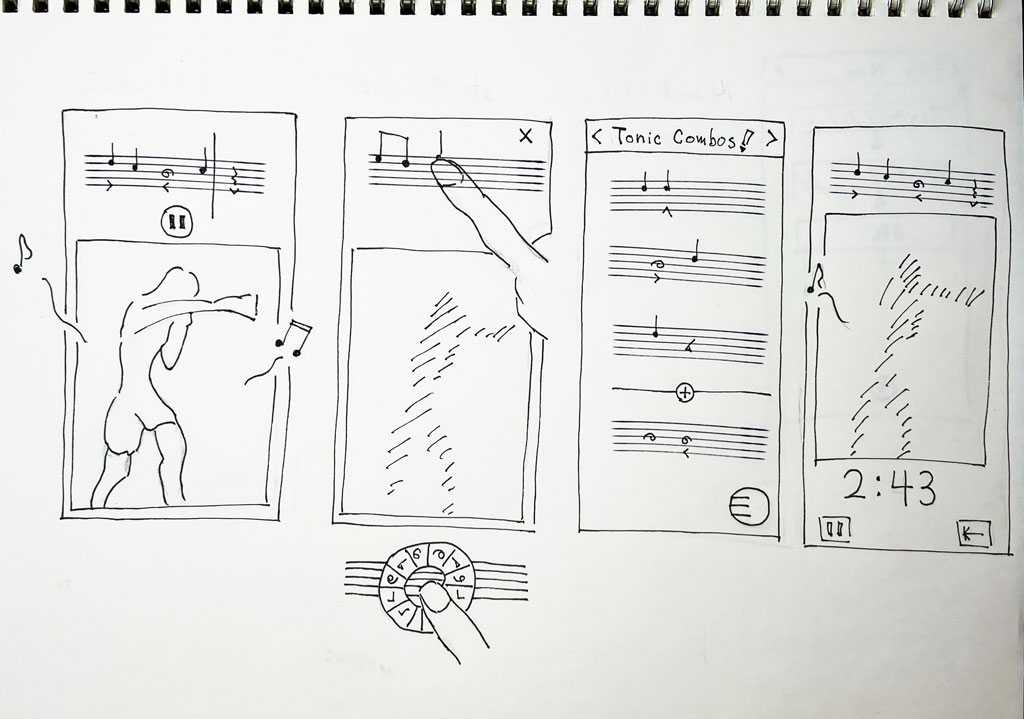
Visualizing the App Through Sketches
Set Object
In sketching and visualizing the app, it seems useful to manage Scores as part of a larger grouping. For example, five combinations for dealing with aggressive fighters, or five combinations for outboxers who keep their distance. Grouping combinations by theme makes sense. Thus, we introduce the “Set” object as a collection of Scores. When shadowboxing, users will likely use multiple Scores rather than a single one, making Set a useful concept for shadowboxing practice.
Set Object: A collection of Scores organized by theme, providing core Scores for shadowboxing mode.
The Set object allows, for example, the creation of a “Fighter Strategies” set containing five Scores.
Menu Object
In shadowboxing mode, users need to specify the Scores to play. Since shadowboxing typically spans multiple rounds, it’s necessary to pre-define which Scores to use in each round. For example, a tonic combination set for round 1, a subdominant combination set for round 2, and so on. This round-to-set mapping is called a menu, represented in the system by the Menu object.
Menu Object: Defines which Set to play in each round for shadowboxing.
Main Functions
Based on the sketches, the app will require the following main functions.
Score Display Function
As a core function, users need to be able to view Scores to recall boxing movements. For beginners unfamiliar with Scores, the app may also need a function to automatically display the Score as human movements in 3D graphics.
Score Input Function
Score input should be quick and easy, focusing on smartphone input. In the future, other input methods like computer keyboard and camera scanning will be added for convenience.
Set Display, Creation, Editing, and Deletion Function
To organize Scores by practice theme, users should be able to add Scores to Sets, move them between Sets, and rename Sets.
Shadowboxing Function
Similar to shadowboxing in a boxing gym, where each round has a specific focus, the app guides users through combinations for each round. Instructions are delivered through audio, not visual displays, to avoid disrupting shadowboxing. Score playback can be sequential or random.
Menu Display, Creation, Editing, and Deletion Function
Menu settings define the shadowboxing mode, specifying the total number of rounds and the Set for each round.